
Gemini 4 Neon for PDFs and Spreadsheets: How to Test the Answers
Gemini 4 Neon is on pirouter. See which file inputs are verified, how to check answers against PDFs and spreadsheets, and what Neon costs.
Gemini 4 Neon is available on pirouter. Google lists PDF and Excel input for Neon on supported APIs, but pirouter hasn’t verified those file formats in this rollout. The test that matters for document review is whether the model can point to the clause and the cell behind the same conclusion—and flag what it can’t reconcile.
Which documents can Neon read?
The Gemini 4 Neon launch announcement describes analyzing spreadsheets, PDFs, charts, audio and video. The Cloud model documentation lists PDF, text, Office files such as .docx, .pptx and .xlsx, and OpenDocument formats for Google’s GenerateContent and Interactions APIs. On pirouter, the launch checks verified text, PNG images and WAV audio, including billing. The model catalog lists PDF and video inputs, but neither was tested in this rollout. Office input is documented by Google, not verified through pirouter.
Even on those APIs, accepting a file is different from seeing every detail you need. Google notes that OCR isn’t used by default for scanned PDFs. If a clause exists only as pixels in a signed scan, make that file a test case. Likewise, check whether your workflow needs the displayed value in a workbook or the underlying formula. Don’t treat file acceptance as evidence that the distinction survived upload. The Google Cloud model specification lists text output. A review in text and an edited, validated workbook are different deliverables; the latter needs its own writing and verification step.
What a checkable answer looks like
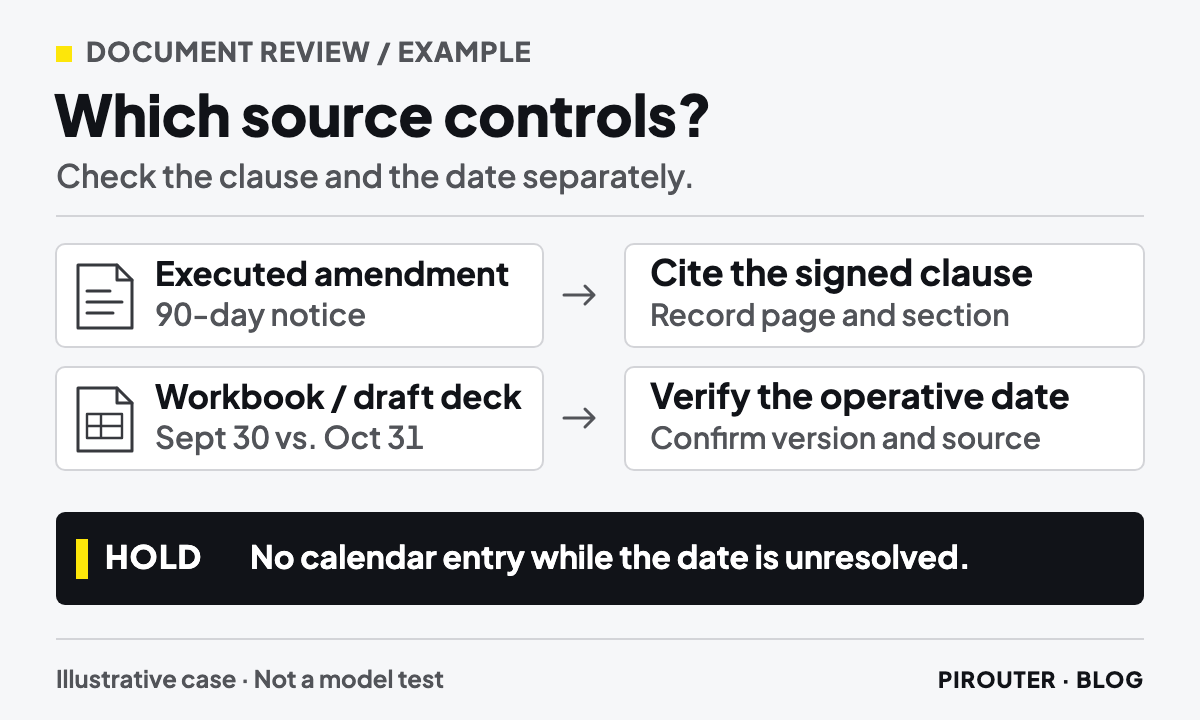
Suppose a legal operations team wants to know the last day it can give notice before a renewal. The original agreement says 60 days. An executed amendment says 90. A pricing workbook lists September 30 as the renewal date, while a draft sales deck still shows October 31. The job isn’t to pick the date that appears most often. It is to establish which notice clause governs, confirm the operative renewal date, and then apply the counting rule. This is an example, not a Neon test result.
Ask for one row per finding: the proposed answer, the supporting file and version, the page and section or worksheet and cell, and the reason any conflict remains open. If the workbook is the only evidence for September 30 and nothing establishes that it is authoritative, the result should be conditional, not a calendar entry. For a test, have a reviewer open the citations. A real page number attached to the wrong clause is still a failed answer.
Google reports 73.5% on Chartography, a test of reading dense professional charts. The Gemini 4 Neon evaluation methodology says Google computed Neon’s score without tools, following the public leaderboard methodology. That’s a reason to include chart-heavy files in a trial, not an estimate of how often Neon will cite the right clause or resolve two versions of a document. The model card also notes that Neon can hallucinate. Require evidence for each material finding rather than accepting a general list of sources at the end.
What does a document review cost?
On pirouter, Neon has a 1,048,576-token context window and a 65,536-token maximum output. The window is shared by input and output; Google’s specification counts thinking, function calls and the final answer toward a single generation segment. Don’t assume a continuation feature on one of Google’s own APIs applies to every gateway endpoint.
Choose low, medium, high (the default) or xhigh. A production gateway check on one prompt used 414 reasoning tokens at high and 2,299 at xhigh. Responses and Gemini’s native API were also checked with xhigh in development. Those counts demonstrate the setting took effect in that test, not a typical cost or an improvement in answer quality. Neon rejects minimal and none with HTTP 422 and lists the supported levels instead of silently switching levels.
pirouter’s standard rates are in USD per million billed tokens:
| Billing component | pirouter rate |
|---|---|
| Uncached input (text, images, video or audio) | $3.00 |
| Cached input read | $0.15 |
| Output, including reasoning | $15.00 |
The cache-read rate applies only to tokens billed as cache reads. When comparing a trial with your current pipeline, count usage across all calls and retries, then track review time separately. A concise answer can still use substantial reasoning on the bill. Start at high and test xhigh on the same hard cases only if there’s an error you need it to fix.
Check access before you switch the pipeline
Neon went live on pirouter on November 23, 2026 at 04:52 UTC (12:52 Beijing time) as google/gemini-4-neon, with gemini-4-neon as an alias. Google’s enterprise Cloud channel limits access to verified customers in selected regions. To call Neon through pirouter, use your pirouter API key; you don’t need to qualify for Google’s enterprise program yourself.
Use POST /v1/chat/completions or POST /v1/responses with or without streaming, or Gemini’s native generateContent or streamGenerateContent. POST /v1/messages isn’t available for Neon and returns HTTP 422.
Begin with a small set of files your team has already reviewed. Use synthetic or redacted material and check your organization’s data-handling rules before sending contracts. Include a clean packet, a scan and a pair of conflicting revisions. Keep the files and acceptance rules fixed when comparing Neon with your current workflow. Track wrong-version answers, unsupported findings, omissions and reviewer time. Let the model draft the review only if it makes the evidence faster to check. Keep unresolved findings out of any workflow that would send a notice or commit a date automatically.