
GitHub Copilot cloud sandboxes now share your Actions allowance
GitHub began metering Copilot cloud sandboxes on November 23. See what shares the Actions allowance, what still costs money after Stop, and how to leave room for CI.
GitHub started billing for Copilot cloud sandboxes on November 23, 2026. If your private-repository CI and Copilot cloud sandboxes use the same billing account, eligible CI and running sandbox CPU and memory can now spend the same included GitHub Actions dollars. This is a compute billing change, not a Copilot seat-price increase; it does not draw from the Copilot AI credits budget, and stopped-sandbox storage sits outside the compute allowance.
The dates mark different things. In its October 28 changelog for the Copilot cloud experience, GitHub announced the new experience and began rolling it out to paid Copilot users. The November 19 editor’s note records when GitHub added the specific billing date to that announcement. November 23 is when sandbox billing began, not when the cloud experience first became available.
Which Actions usage shares the pool?
GitHub now expresses included Actions compute as dollars, not a fixed count of standard runner minutes. A build still uses a runner priced by the minute; a sandbox uses CPU and memory priced by the second. GitHub works out the dollar value at each product’s own rate and deducts eligible usage from the same allowance. The allowance resets at the start of the account’s billing cycle. Neither builds nor sandboxes get priority, according to GitHub’s cloud sandbox billing documentation.
As of November 24, GitHub’s included usage by plan lists these amounts:
| GitHub plan for the billing account | Included Actions compute per month |
|---|---|
| GitHub Free | $12 |
| GitHub Pro | $18 |
| GitHub Free for organizations | $12 |
| GitHub Team | $18 |
| GitHub Enterprise Cloud | $300 |
Read the left column as the GitHub plan on the account that pays, not the developer’s Copilot subscription. An account with an Actions allowance does not automatically get cloud sandbox access. GitHub describes the new experience and cloud sandboxes as generally available on paid Copilot plans; for managed users, the Copilot in the cloud policy and repository access still matter. GitHub also says sessions that depend on Actions-based self-hosted runners or copilot-setup-steps.yml still need Actions as their environment. This is not a reason to assume every Copilot session uses the sandbox meter.
Standard GitHub-hosted runners for private or internal repositories draw from the pool. Standard hosted runners on public repositories and self-hosted runners do not reduce it. Larger runners are a separate case: they are billable even in public repositories, and where they’re available they can draw from the pool on Team and Enterprise Cloud. So an organization with only public repositories should not conclude that every workload it launches is free.
What keeps charging after you stop a sandbox?
The running charge is based on elapsed runtime and allocated resources. The CPU rate is $0.000024 per vCPU-second. Memory is $0.000003 per GiB-second, based on how much RAM the sandbox was given, not how much its processes actually touched. The meter runs from session start until stop or deletion. A sandbox that remains running while you read a pull request is still running; count the seconds, not the number of prompts.
GitHub’s sandbox meter and pricing reference provides the rates. Its worked example uses 2 vCPUs and 4 GiB for 600 seconds. That’s 2 × 600 × $0.000024 = $0.0288 for CPU and 4 × 600 × $0.000003 = $0.0072 for memory, or $0.036 of compute allowance. The example illustrates the calculation, not a promise that every session gets that configuration.
Stop when you’re done for now and need to resume the same environment. Both running meters stop, but GitHub keeps a snapshot and meters that storage at $0.005 per GiB-month until you delete the sandbox. That rate applies to the snapshot’s stored size, not the sandbox’s RAM. It’s outside the shared compute pool, even if you have compute allowance left.
Delete when you don’t need to come back to that environment. First make sure any work you want to keep is saved somewhere outside it. Deletion ends the snapshot meter; it does not erase usage already incurred. Base the choice on whether the environment itself is worth keeping, not whether someone might read the pull request again. For short waits, don’t rely on a guessed idle timeout or assume closing the client changes the sandbox’s state. Check the actual state. GitHub lists local sandboxing separately as included in the standard Copilot seat at no additional sandbox cost.
A four-person team’s $18 Actions ledger
Imagine a four-person team on GitHub Team with one billing account for CI and its cloud sessions. Its private-repository builds have already used $15.60 of the $18 included compute allowance this cycle. The team ran 60 ten-minute sandboxes, each at the 2 vCPU and 4 GiB configuration above. These are planning assumptions, not invoice records. The team has no other eligible compute usage in this example, and the ledger excludes storage, AI credits and seat fees.
On a small screen, scroll the table sideways to see the dollar amounts.
| Entry | Calculation | Amount |
|---|---|---|
| Monthly included compute | GitHub Team plan | $18.00 |
| Private CI already used | Assumed eligible usage at published runner rates | −$15.60 |
| Sandbox CPU and memory | 60 × $0.036 | −$2.16 |
| Included compute remaining | $18.00 − $15.60 − $2.16 | $0.24 |
| Next release build | Assumed cost in the same cycle | $0.60 |
| Potential compute overage | $0.60 − $0.24 | $0.36 |
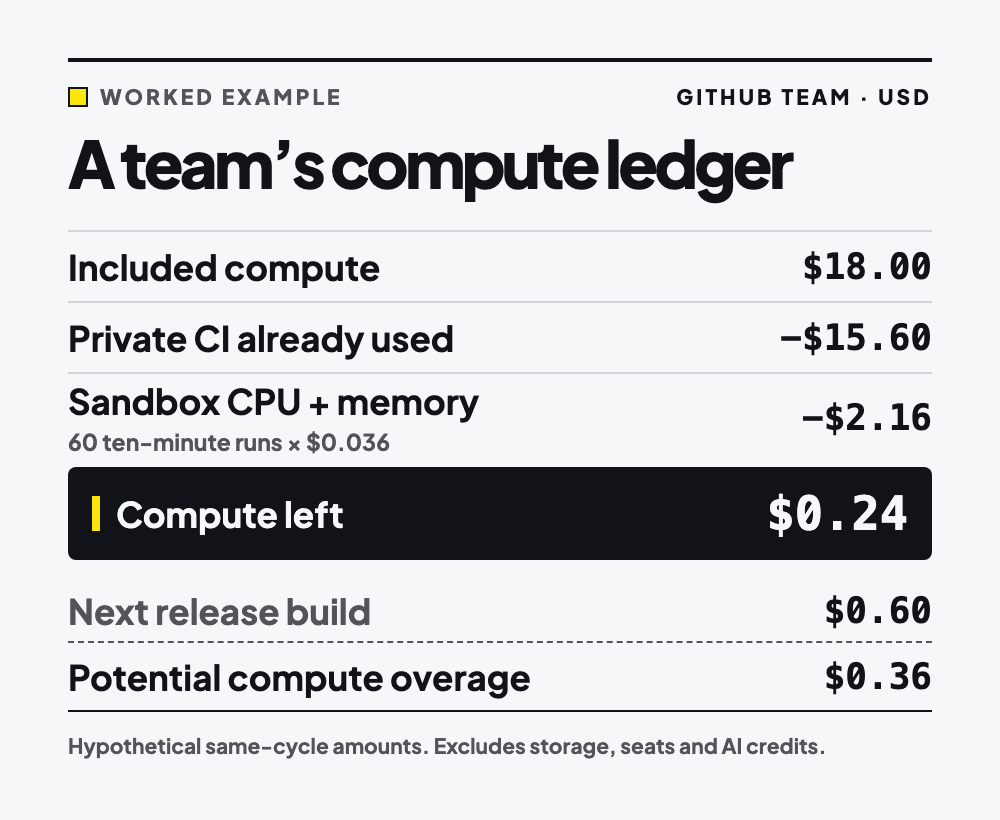
The team hasn’t paid a compute overage yet. It has used $17.76 worth of included compute and faces a $0.36 gap if the release build costs what it expects and the account allows usage past the allowance. If it had set aside the $0.60 release estimate in its own planning, it would have had $1.80 for sandboxes after the $15.60 CI spend. That would cover exactly 50 of those ten-minute sessions, not 60. The reserve is a planning decision, not a CI priority setting in GitHub.
The session count only works if the runtime holds. One extra running hour on that configuration uses $0.216, almost all of the $0.24 planning balance even before the release run. For a team this close to its allowance, monitor both dollars left and the cost of CI still to come. Start that forecast with builds you can’t skip, including any release checks you expect to rerun. Revisit it after a heavy CI day instead of giving everyone a fixed session count for the cycle.
How to reconcile an unexpected sandbox charge
- Start with the account that owns the session. GitHub bills the repository owner for a repository-backed session, whether that owner is an organization or a personal account. A session can span repositories with the same owner. Without a repository, check which owner was selected at session creation; with no selection, GitHub says the personal account is billed. A developer launching a session from a paid Copilot seat doesn’t tell you which account spent the compute.
- Use one billing cycle and separate usage from what you owe. In the owner’s billing view, compare cloud sandbox usage, billable amounts and remaining included compute. GitHub points to the relevant views in Viewing your cloud sandbox usage. Reconcile eligible CI and sandbox CPU and memory against the same balance. Don’t add a gross usage total to the net bill, or compare CI from one account with sandboxes from another.
- Check whether the charge follows runtime or retention. For a running-cost discrepancy, compare actual start and stop times and the configuration, if available, with your estimate. For a stopped session, check whether it still has a snapshot and whether the sandbox was deleted. A positive compute balance doesn’t rule out a storage charge. Keep storage separate instead of trying to back into a session’s duration from a combined dollar total.
- Verify the spending limit for the right product. Use a cloud sandbox product-level or SKU-level budget; the Bundled AI credits budget does not cover sandbox usage. Under GitHub’s cloud sandbox budget rules, usage is blocked after the quota is used up without a valid payment method. With a valid payment method, check the applicable budgets and whether Stop usage when budget limit is reached is enabled. An enforcement setting can block additional usage in scope; it isn’t a substitute for stopping or deleting a sandbox you’re done with.
Before the next cloud pilot, have the person who owns the CI budget check the account’s remaining compute, subtract the cost of builds that still need to run this cycle, and decide how much room is left for sandboxes. Then agree on which environments are worth resuming and who deletes them when the work is done. That handles both ways the bill can surprise you: running compute that uses CI’s headroom and snapshots that don’t use the pool at all.